

Technology
Samsung Galaxy Phones And Tablet Users To Get Arc Search Browser Soon, All You Need To Know!





Welcome back to FMTBLOG. Thank you for visiting. Today, in an exclusive scoop from our in-house expert, PenGossiper, we’ve got some big news for Samsung users and fans worldwide.
Table of Contents
Introduction
The tech world is exciting as Samsung Galaxy phones and tablets prepare to welcome the Arc Search Browser. This innovative browser promises to revolutionize our search, browse, and interact with the web. If you’re a proud Samsung Galaxy device owner or a tech enthusiast, you’re in for a treat!

In this blog post, we’ll explore what makes Arc Search Browser so groundbreaking, how it enhances the user experience on Samsung devices, and why it’s set to become a game-changer. We’ll also provide practical tips on how to make the most of this new browsing experience. By the end of this post, you’ll be eager to try Arc on your Samsung Galaxy phone or tablet.
What is Arc Search Browser?
Arc Search Browser is a cutting-edge web browser designed with the latest technologies to offer a seamless and efficient browsing experience. Unlike traditional browsers, Arc focuses on user-centric features, prioritizing speed, security, and ease of use. Its intuitive interface and powerful search capabilities stand out in the crowded browser market.

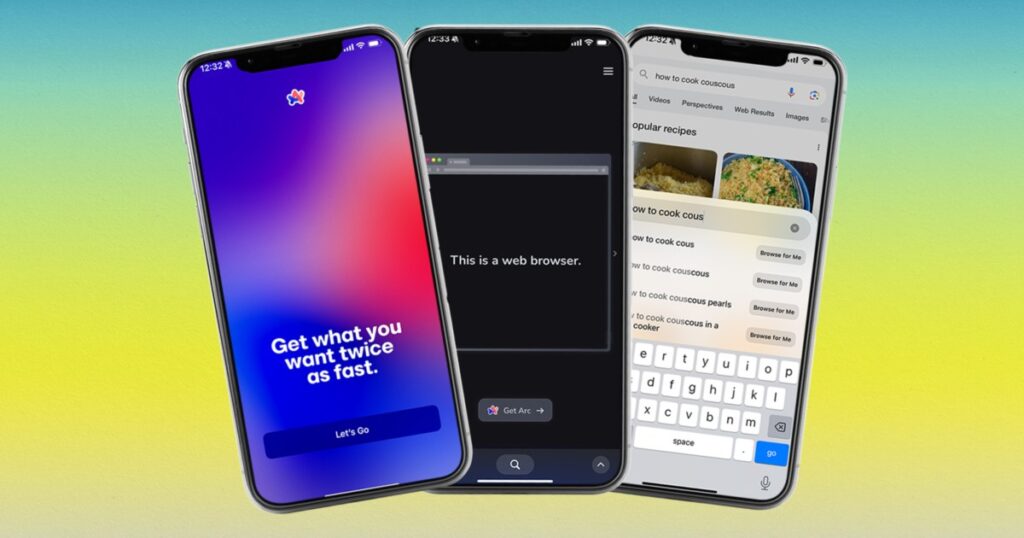
The development team behind Arc has integrated advanced AI and machine learning algorithms to ensure that users receive the most relevant search results. This means less time scrolling through pages and more time finding what you need. Arc also boasts enhanced privacy features, ensuring your data remains secure while you browse.
READ ALSO-Samsung Stunned Galaxy A Series Smartphone Users With This AI Feature! Check It Out
Why Arc Search Browser is Ideal for Samsung Galaxy Devices
Samsung Galaxy devices are known for their powerful hardware and sleek design. The addition of Arc Search Browser takes full advantage of these features, offering an optimized browsing experience that complements the device’s capabilities.
Arc is designed to provide smooth and responsive performance using a Galaxy phone or tablet.
One of the standout features of Arc is its ability to adapt to different screen sizes and resolutions. This makes it perfect for the diverse range of Samsung Galaxy devices.
Whether you’re browsing on a compact phone or a large tablet, Arc automatically adjusts to provide the best viewing experience. The browser’s intuitive design ensures all controls are easily accessible, making navigation a breeze.
Enhanced Search Capabilities
The heart of any browser is its search functionality, and Arc excels in this area. Powered by advanced algorithms, Arc delivers highly relevant search results in seconds. Its AI-driven search engine learns from your browsing habits, ensuring the results you see are tailored to your preferences.
READ ALSO- Why ONE UI 7.0 Update Is Special: Check Out 7 Key Features To Look Out For (VIDEO)
Arc also offers a unique feature called “Smart Predictive Search.” This feature anticipates what you’re searching for based on your typing and provides real-time suggestions. It’s a game-changer for those who want to find information quickly without typing out entire queries.
Seamless Integration with Samsung Ecosystem
Arc Search Browser is designed to integrate seamlessly with the Samsung ecosystem. This means you can easily sync your bookmarks, history, and preferences across all your Samsung devices. The integration extends to Samsung’s proprietary apps and services, providing a cohesive experience.
For instance, using Samsung Notes, you can save web pages directly to your notes for easy reference later. Similarly, Arc integrates with Samsung’s multi-window feature, allowing you to multitask efficiently. You can browse the web while taking notes or watching a video, all on the same screen.
Faster Page Load Times
People prefer to wait for web pages to load, and Arc understands this. The browser is optimized for speed, ensuring pages load rapidly, even on slower connections. Arc achieves this by using advanced caching techniques and content delivery networks (CDNs) to reduce latency.
Arc’s lightweight design also uses fewer system resources, resulting in a smoother browsing experience. This is particularly beneficial for older Samsung devices that may need to have the latest hardware. With Arc, you can enjoy fast browsing without compromising on performance.
Enhanced Privacy and Security
In today’s digital age, privacy and security are paramount. Arc Search Browser places a strong emphasis on protecting your data. The browser includes built-in ad blockers and anti-tracking features to keep your online activities private.
Arc offers a “Private Mode” beyond traditional incognito modes in other browsers. In Private Mode, Arc deletes your browsing history, cookies, and cache as soon as you close the session. This ensures that no trace of your activity is left behind.
Customizable Interface
One of the standout features of Arc is its highly customizable interface. Users can personalize the browser to suit their preferences, from changing the theme to rearranging the toolbar. Arc offers a range of themes, including dark mode, which is easier on the eyes during night-time browsing.
JOIN THE CONVERSATION– → Telegram | X/Twitter | Facebook | WhatsApp|WhatsApp Channel|Mobile App|Instagram
The browser also allows users to create custom shortcuts for their favorite websites. This means you can access your most-visited sites with a single tap, saving time and effort. Arc’s flexible design ensures you can tailor the browsing experience to match your workflow.
Offline Browsing
Arc Search Browser includes robust offline browsing capabilities, allowing you to save web pages and access them without an internet connection. This is particularly useful for Samsung Galaxy users who are often on the go. Whether on a flight or in a remote area with limited connectivity, Arc ensures you can still access your essential content.
The offline mode also supports multimedia content to save and enjoy videos, images, and articles without an active internet connection. This feature is a lifesaver for those who need to work or study offline.
Efficient Tab Management
Managing multiple tabs can be a hassle, but Arc makes it easy with its efficient tab management system. The browser includes features like tab grouping and pinning, allowing you to organize your tabs effectively. You can group related tabs for easier access and pin important tabs to keep them always visible.
Arc also introduces a “Tab Preview” feature, which shows a thumbnail of the web page when you hover over a tab. This makes finding the tab you’re looking for more accessible, mainly when many open tabs exist.
Voice Search and Commands
Arc Search Browser offers voice search and commands, incorporating the latest AI technology, making it even more user-friendly. This feature is handy for Samsung Galaxy users who rely on voice assistants like Bixby. With Arc, you can perform searches, open web pages, and even control browser settings using your voice.
Voice search is not only convenient but also enhances accessibility for users with disabilities. Arc’s voice recognition technology is highly accurate, ensuring your commands are understood and executed correctly.
Reading Mode
Arc includes a dedicated reading mode that strips away ads and other distractions, allowing you to focus on the content. This feature is perfect for Samsung Galaxy users who enjoy reading articles, blogs, and e-books on their devices. Reading mode presents the text in a clean, easy-to-read format, enhancing the overall reading experience.
The reading mode also includes customization options, allowing you to adjust the font size and background color to suit your preferences. Whether you’re reading in bright daylight or dim lighting, Arc ensures a comfortable reading experience.
Sync with Cloud Services
Arc Search Browser integrates with popular cloud services like Google Drive, Dropbox, and OneDrive. This allows you to save and access your files directly from the browser. This feature enhances productivity and convenience for Samsung Galaxy users who rely on cloud storage for work or personal use.
You can easily upload and download files, share documents, and collaborate with others, all within the Arc browser. This integration ensures that your important files are always accessible, no matter where you are.
Regular Updates and Support
The team behind Arc is committed to providing regular updates and support to ensure the browser remains at the forefront of technology. Users can expect frequent updates introducing new features, improving performance, and enhancing security. The support team is also readily available to assist with any issues or queries.
Samsung Galaxy users can rest assured that they are using a constantly evolving and improving browser. With Arc, you are always equipped with the latest tools and features to enhance your browsing experience.
Conclusion
The introduction of Arc Search Browser on Samsung Galaxy phones and tablets marks a significant milestone in the world of web browsing. With its advanced features, user-centric design, and seamless integration with the Samsung ecosystem, Arc is set to redefine how we interact with the web.
Whether you’re a casual browser or a power user, Arc offers something for everyone. From enhanced search capabilities to robust privacy features, Arc ensures a superior browsing experience. If you haven’t already, it’s time to experience the future of browsing with Arc on your Samsung Galaxy device.
JOIN THE CONVERSATION– → Telegram | X/Twitter | Facebook | WhatsApp|WhatsApp Channel|Mobile App|Instagram
Ready to take your browsing experience to the next level? Try Arc Search Browser today and discover a world of possibilities. You won’t be disappointed.


Galaxy S26 Update Removes Perplexity’s Hey Plex Feature
Samsung’s February 2026 update removed the Hey Plex voice wake-up from the Galaxy S26 series. Here’s what happened and what users can do now.
Samsung’s Galaxy S26 series launched with one of its most talked-about AI features, Perplexity’s “Hey Plex” voice wake-up. But a recent software update has quietly pulled it from the device, leaving early adopters confused and wondering what comes next.
If you’ve just picked up a Galaxy S26 Ultra and noticed that Hey Plex has disappeared from your Perplexity settings, you’re not imagining things.
The February 2026 security update removed the Hey Plex detection option entirely. Here’s a full breakdown of what happened, why it matters, and what Galaxy S26 users can do in the meantime.
What Was Hey Plex?

When Samsung unveiled the Galaxy S26 series at Unpacked, one of its headline AI announcements was a deep integration with Perplexity—a conversational AI assistant known for delivering real-time, source-cited answers from the web.
As part of this partnership, Perplexity gained system-level access on Galaxy S26 devices. That’s a significant deal. It meant Perplexity’s AI could read from and write to system apps, saving information directly into Samsung Notes, for instance, and editing it later.
Unlike third-party apps that sit in a silo, Perplexity was embedded at the operating system level.
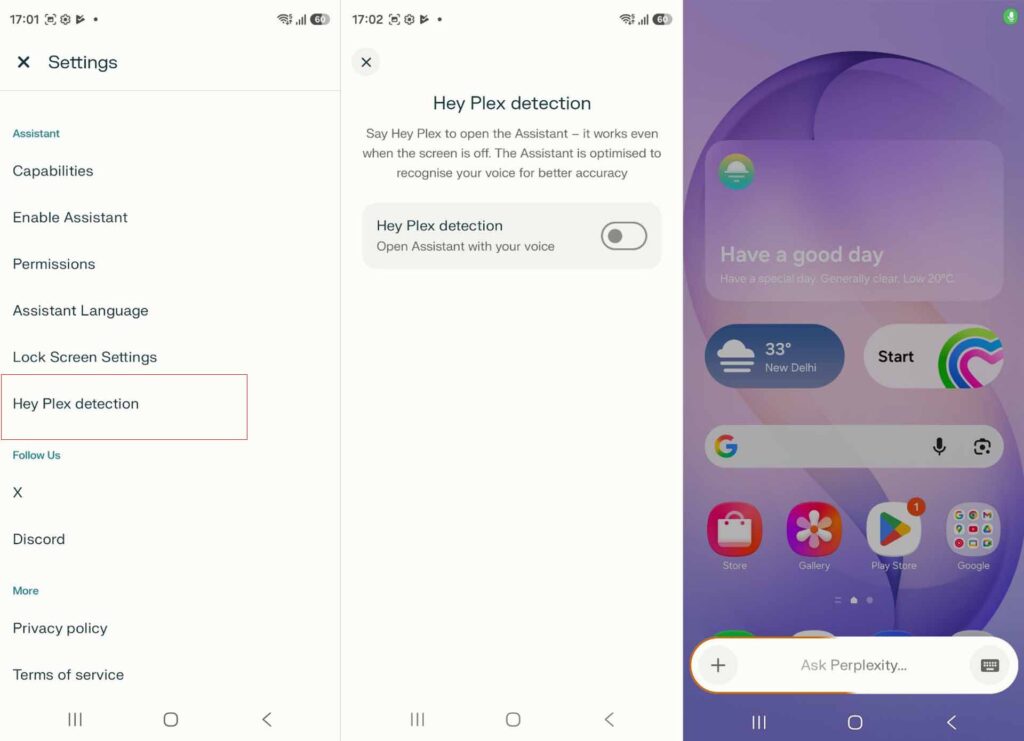
The Hey Plex feature was the most visible expression of this integration. Similar to how users can summon Google’s Gemini by voice, saying “Hey Plex” would launch a screen overlay of Perplexity’s voice agent, even when the screen was off. Users could ask questions, get sourced answers from the internet, and interact with their phone hands-free.
To set it up, users navigated to the Perplexity app settings, enabled “Hey Plex detection” under the Assistant section, and completed a short voice registration process by repeating a series of on-screen sentences.
READ ALSO: Galaxy Buds 4 Introduce AI‑Enhanced HD Voice to Transform Call Quality
What Changed After the February 2026 Update?
The February 2026 security update, the first major software update for the Galaxy S26 series, removed the Hey Plex detection option from the Perplexity app on Galaxy S26 devices.
The feature was confirmed as working before the update. After the update rolled out, the Hey Plex detection setting was no longer visible in the Perplexity app, and the voice wake-up phrase stopped functioning altogether on the Galaxy S26 Ultra.
The same change likely affects the standard Galaxy S26 and Galaxy S26+ as well, though the S26 Ultra is the confirmed case.
It is worth noting that Perplexity’s dedicated voice assistant remains accessible via the device’s side button. So users haven’t lost access to Perplexity itself, just the hands-free wake-word functionality that made the integration particularly seamless.
Why Was Hey Plex Removed?
Neither Samsung nor Perplexity has issued an official statement explaining the removal. It is unclear whether the feature was pulled due to a technical conflict introduced by the security patch, a stability issue, a licensing or regulatory concern, or a planned revision ahead of a more polished re-release.
Given that Hey Plex was actively working immediately after device launch and was set up and verified by users before the update, the removal appears to be update-related rather than a reversal of the feature altogether.
What Can Galaxy S26 Users Do Right Now?
If you relied on Hey Plex for hands-free AI access, your options are limited for now. Here’s where things stand:
- Side button access remains available. You can still launch Perplexity’s voice assistant by pressing the dedicated side button, though this requires physical interaction with the device.
- Gemini and Bixby are unaffected. The Galaxy S26 series supports Gemini, Bixby, and Perplexity as selectable AI assistants. If voice wake-up is a priority, Gemini’s voice activation remains functional.
- Monitor future updates. Samsung has not confirmed a timeline for Hey Plex’s return, but given that it launched as a featured capability of the Galaxy S26 series, it is reasonable to expect the feature will be restored in a future software release.
Why This Matters for Galaxy S26 Owners
The Hey Plex removal is more than a minor inconvenience. Samsung’s pitch for the Galaxy S26 was, in large part, built around its AI versatility, the ability to choose between Gemini, Bixby, and Perplexity depending on personal preference. Perplexity’s system-level access and wake-word functionality were central to that proposition.
For users who chose the Galaxy S26 specifically because of its Perplexity integration, the loss of Hey Plex, even temporarily, undermines a core part of the device’s advertised experience.
It also raises questions about the stability of deep third-party AI integrations and how quickly features can disappear following routine security patches.
That said, this is likely a temporary setback. Samsung and Perplexity’s partnership is still intact, and the underlying system-level access that makes the integration powerful hasn’t been removed. The voice wake-up feature is the piece that’s missing, and it seems plausible that a fix is already in progress.
Looking Ahead
The Galaxy S26 series has launched to strong pre-order numbers and genuine excitement around its AI capabilities. The removal of Hey Plex is a stumble rather than a sign of something more serious. Still, it’s a reminder that software updates can introduce unexpected changes, even on brand-new flagship devices.
For now, Galaxy S26 owners affected by this change should keep an eye on Samsung’s update changelog for any mention of Hey Plex’s return. When it does come back, the feature promises to be one of the more compelling hands-free AI experiences available on Android.

Galaxy Buds 4 Series: How AI-Powered HD Voice Changes Call Quality
The Galaxy Buds 4 Series uses AI-powered HD Voice to make calls clearer and noise-free. Here’s how the technology works and how to turn it on.

Phone calls have a clarity problem. Background noise bleeds in, voices cut out, and the person on the other end spends half the conversation asking you to repeat yourself.
Samsung’s Galaxy Buds 4 Series tackles this head-on with HD Voice, an AI-driven feature that promises to make every call sound like you’re in the same room.
Unveiled at Samsung’s Galaxy Unpacked event, the Galaxy Buds 4 Series brings a suite of improvements to wireless audio. But it’s the HD Voice technology that stands out most clearly, and for good reason.
If you’ve ever struggled to hold a conversation on a windy street or in a busy café, the engineering behind this feature is worth understanding.
What Is HD Voice on the Galaxy Buds 4?

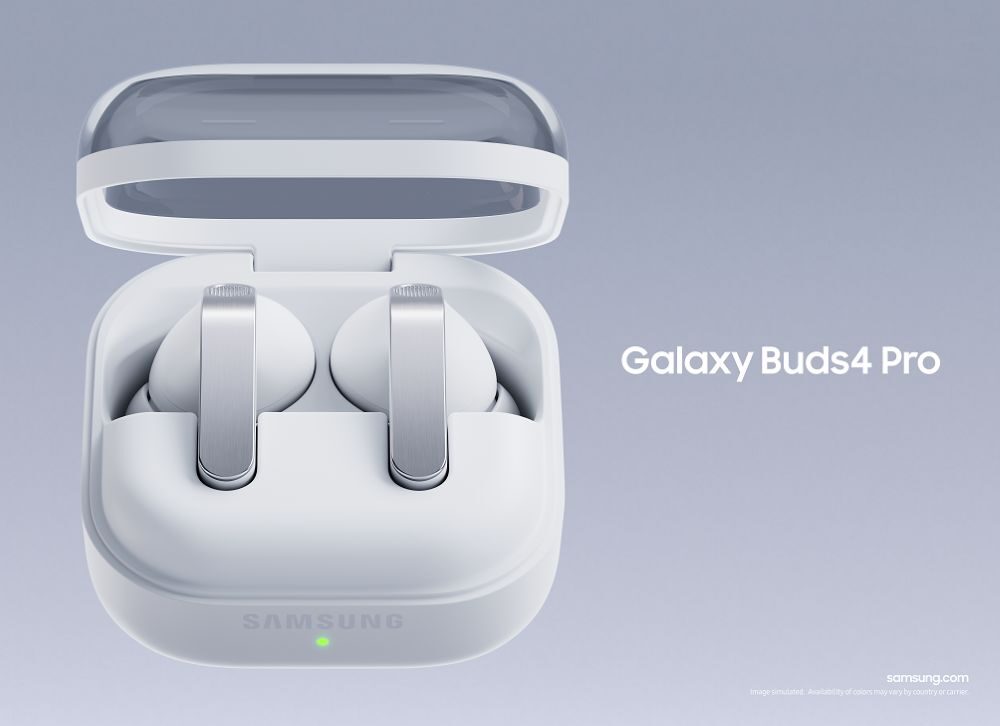
HD Voice is Samsung’s answer to call clarity. At its core, the feature combines multiple hardware components with AI processing to isolate your voice and deliver it to the person you’re speaking with cleanly and accurately.
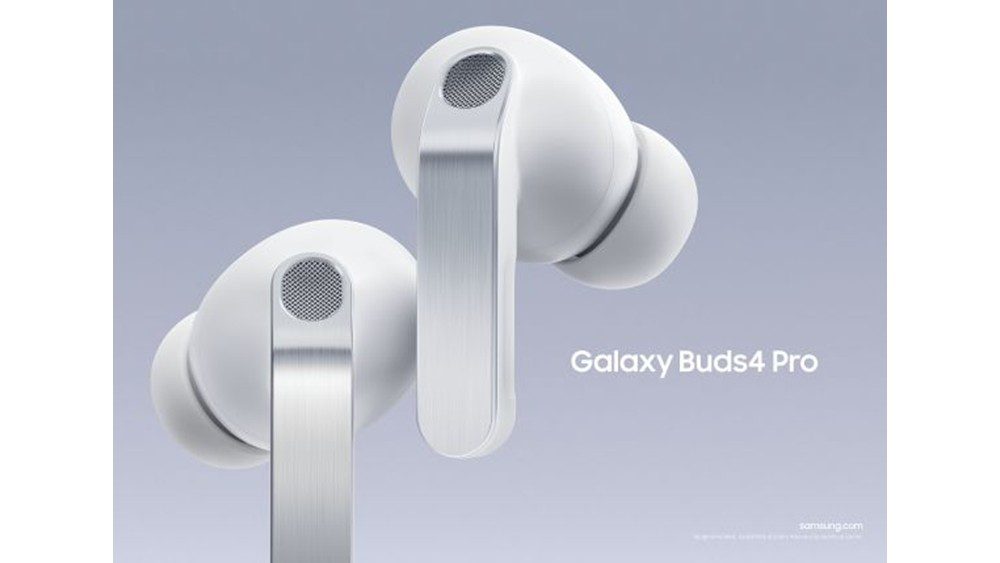
The Galaxy Buds 4 use an array of microphones that capture sound from multiple directions simultaneously. Alongside these microphones sits a component called the Voice Pick Up Unit (VPU), which is specifically designed to detect and lock onto the user’s voice.
While the VPU focuses on the speaker, the AI system works to suppress everything else: traffic, wind, ambient conversations, and other common environmental sounds.
The result is a call experience where the other person hears you clearly, not you, plus a crowded room.
Read also: Caviar Unveils 24K Gold Samsung Galaxy S26 Ultra For $11,490, Limited To Just 76 Buyers.
The Science Behind Clearer Calls
One of the less visible but highly impactful improvements in HD Voice is the expansion of Bluetooth’s audio frequency range. Standard Bluetooth calls operate within a narrow frequency band, which tends to compress voice audio and muddy the finer details of speech.
The Galaxy Buds 4 extend this range to 16 kHz—a specification Samsung refers to as super wideband. This wider range allows more acoustic data to be transmitted during each call, which has a practical effect on comprehension.
Sounds like “s”, “z”, “th”, and “f” are particularly difficult to distinguish over compressed audio. These consonants carry significant meaning in English, and losing them often leads to misheard words and repeated requests for clarification.
By broadening the frequency range, HD Voice preserves these sounds and makes conversations easier to follow from start to finish.
Seamless Integration with Galaxy Devices
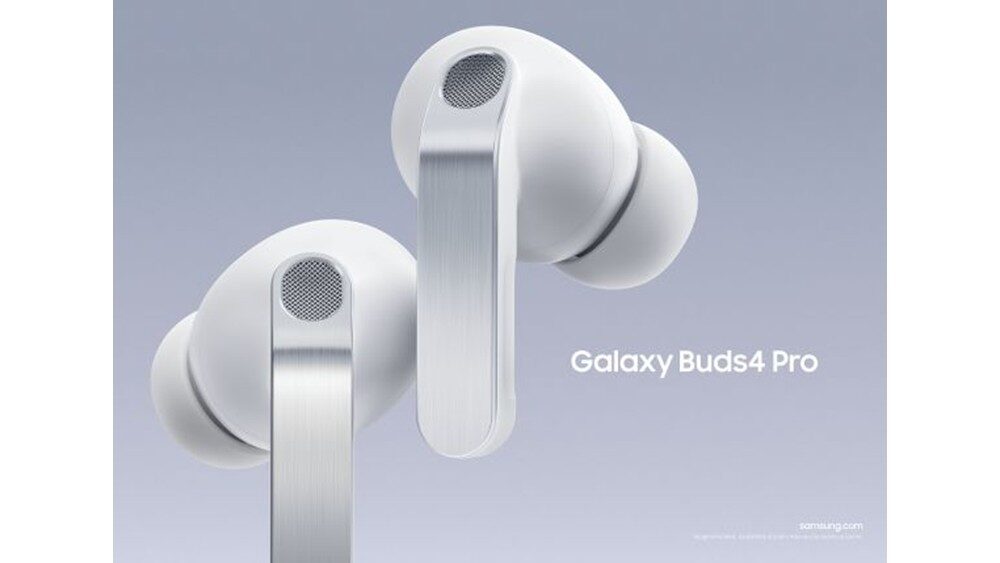
HD Voice reaches its full potential when paired with Samsung’s own ecosystem. The Galaxy Buds 4 Series connects effortlessly with Galaxy smartphones. Open the case near a paired device, and the connection is established automatically.
When used alongside the Galaxy S26 series, the call quality improves further. Samsung has optimised the hardware and software pairing between these devices to deliver the best possible audio performance during calls.
For users who want to enable the feature manually, the path is straightforward:
Settings → Galaxy Buds → Sound Quality and Effects → Advanced Quality Options → Super Wide Band Speech
Once activated, the super wideband setting applies to calls automatically, without requiring any additional input during conversations.
Why Call Clarity Matters More Than You Think
Audio quality during calls is easy to overlook when reviewing a new pair of earbuds. Most attention gravitates toward music performance, active noise cancellation, or design.

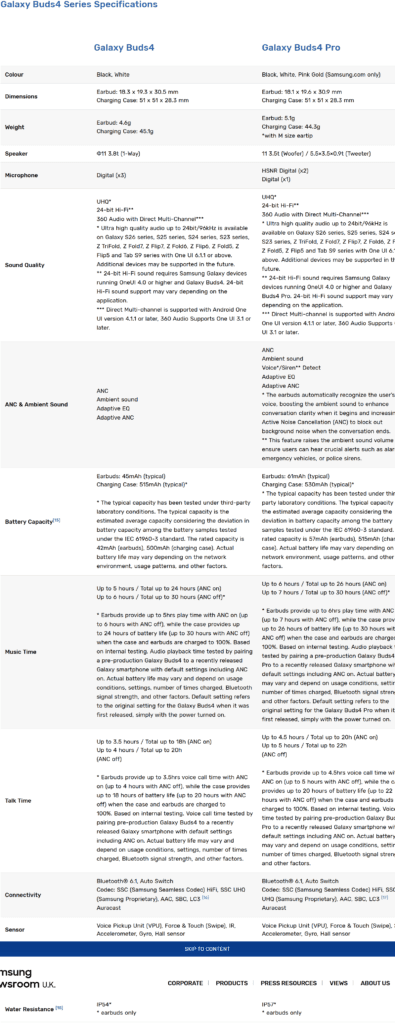
But for remote workers, frequent callers, and professionals who rely on clear communication, call quality is often the feature they notice most in daily use.
A dropped word in a business call, a misunderstood instruction, or simply the frustration of asking someone to repeat themselves—these small friction points add up. HD Voice addresses them by treating call audio with the same level of engineering attention traditionally reserved for music playback.
The Galaxy Buds 4 Series doesn’t just improve how your music sounds. It improves how you sound to everyone else.
A Thoughtful Upgrade for Everyday Communication
Samsung has built HD Voice around a practical understanding of how people actually use earbuds. Most users aren’t wearing them only during gym sessions or commutes; they’re using them throughout the day, cycling in and out of calls, meetings, and conversations.
The multi-microphone setup, VPU technology, AI noise suppression, and expanded Bluetooth frequency range work together as a system rather than as isolated features. Each element supports the others, and the outcome is called audio that feels noticeably more natural.
For anyone who spends significant time on calls, whether for work, family, or anything in between, the Galaxy Buds 4 Series makes a compelling case. HD Voice may not be the loudest feature on the spec sheet, but it could be the one you end up appreciating most.
The Bottom Line
The Galaxy Buds 4 Series represents a meaningful step forward in wireless earbud technology, particularly for call performance. AI-powered HD Voice, super wideband audio at 16kHz, and tight integration with the Galaxy ecosystem combine to address one of the most common frustrations in wireless audio—unclear phone calls.
If call quality is a priority for you, these earbuds deserve a closer look.

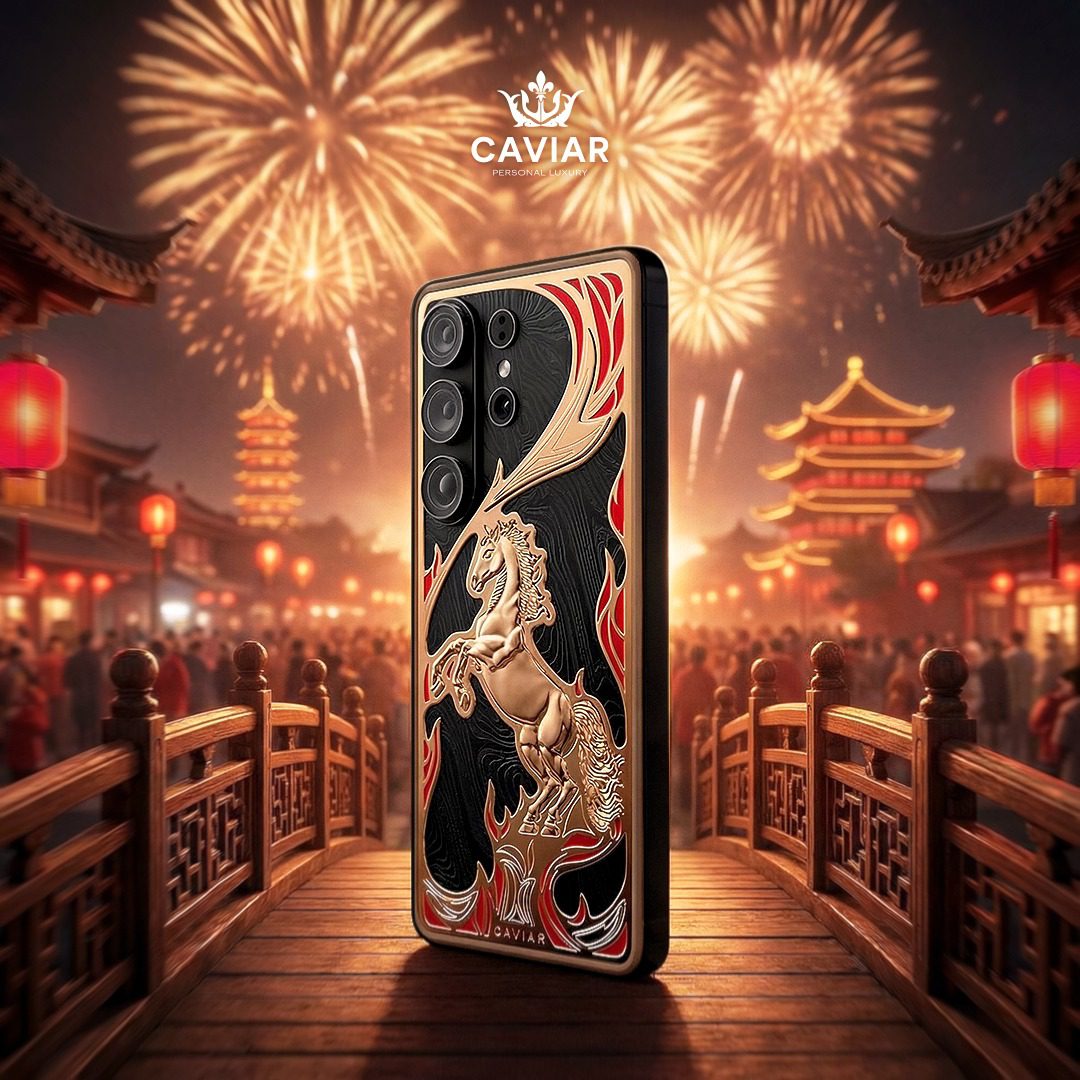
Experience the ultra‑exclusive Caviar Samsung Galaxy S26 Ultra, featuring a 24K gold design and priced at $11,490. Limited to only 76 units worldwide, this luxury edition blends premium craftsmanship with rare collector appeal.

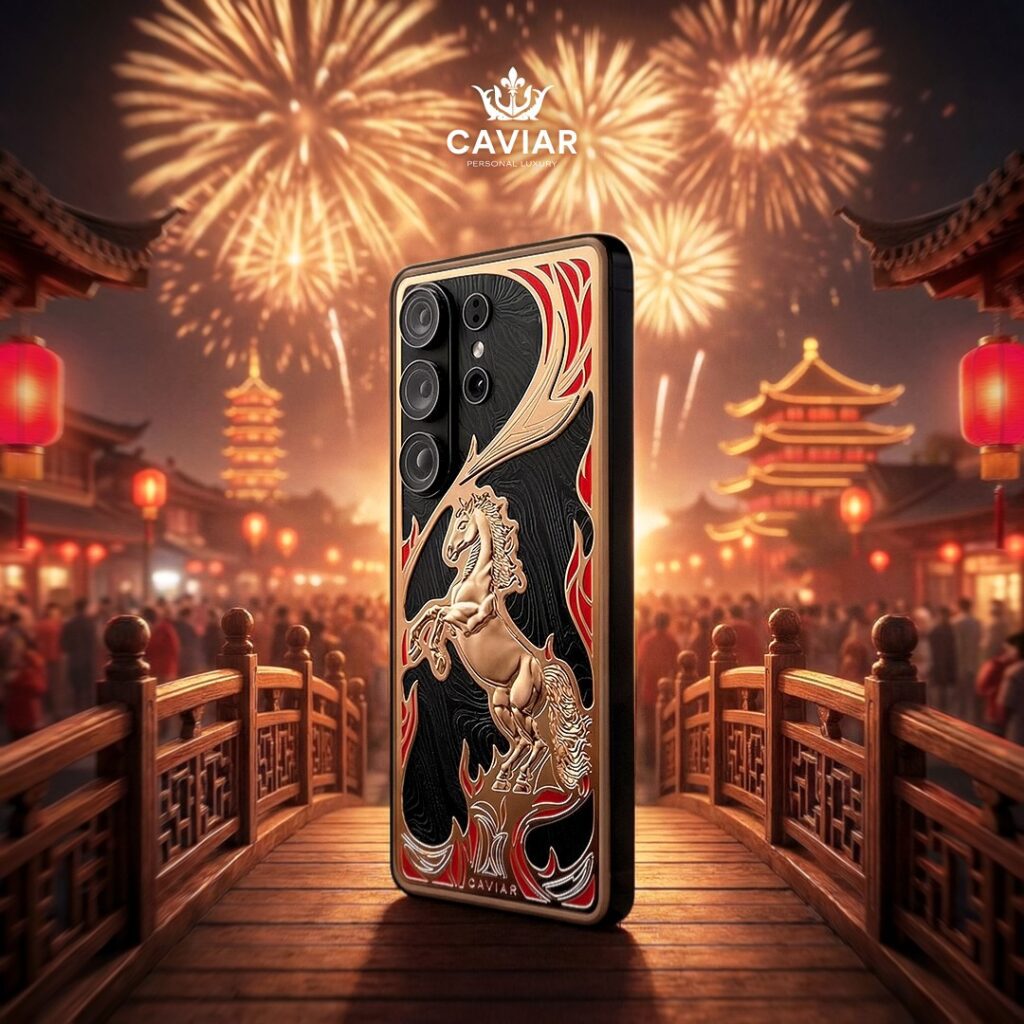
Most people upgrading their phone this year will spend somewhere between $800 and $1,300. Then there’s a very different kind of buyer, one who looks at a flagship smartphone and sees a canvas.
Caviar, the Russian luxury customisation house known for slapping gold and carbon fibre onto high-end devices, just unveiled its latest creation: the Totem collection, a series of modded Galaxy S26 Ultras that starts at $10,490 and tops out at $11,490.
READ ALSO: Samsung Galaxy S26 Ultra Battery and Charging: What’s Changed From S25 Ultra?
That’s not a typo. For context, a standard Galaxy S26 Ultra retails at $1,300, meaning Caviar is charging roughly eight times the base price for materials, craftsmanship, and a story.
Only 76 units exist across the collection, with each design capped at 19 pieces. If you want one, you’ll need to act quickly and have significant resources.
What Is the Totem Collection?
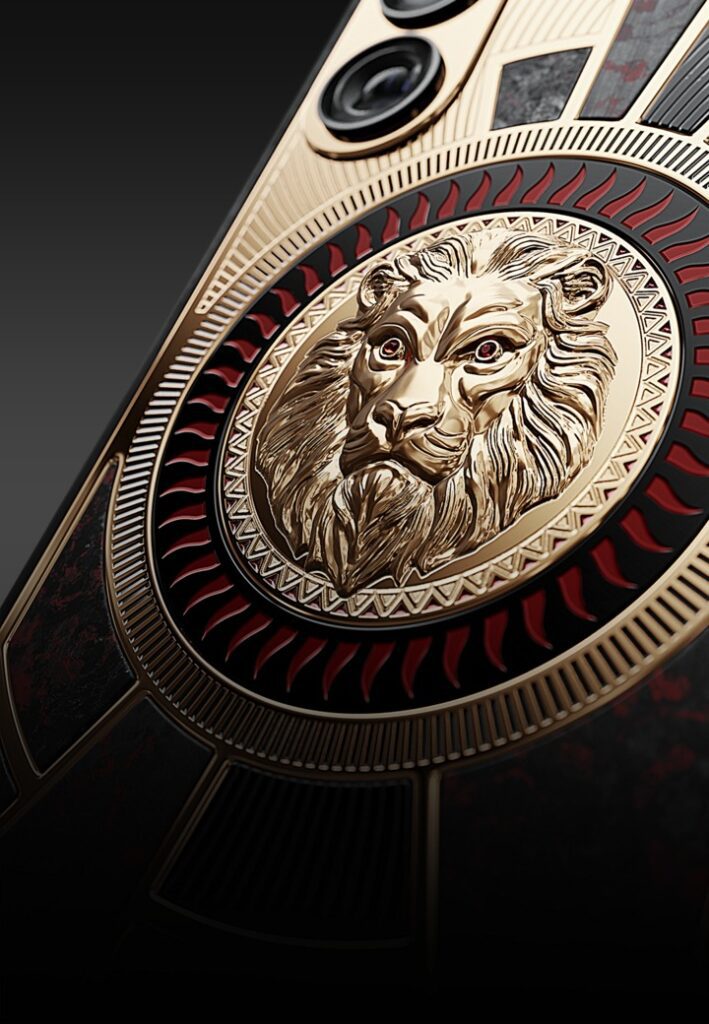
The Totem collection features four designs, each centred on an animal archetype: the Fire Horse, Lion, Falcon, and Wolf. Every model uses premium materials, hand-applied finishes, and a sculptural element, but each has its own distinct aesthetic.
The Fire Horse is the flagship model at $11,490, and it’s the one getting most of the attention. The back features hand-applied red enamel layered over black titanium with a PVD coating, the same finishing technique used by high-end watchmakers like Richard Mille when they want a surface that looks expensive and holds up over time.

The horse itself is a bas-relief sculpture, not a decal or a printed graphic. It rears up from the back of the phone as a three-dimensional piece of metalwork.
Caviar ties the design to the Eastern Zodiac, noting that 2026 is the Year of the Fire Horse. Whether you find that meaningful or marketing, it’s the kind of narrative detail that luxury buyers tend to appreciate. Owning a limited object is one thing. Owning a limited object with a backstory is another.
The Lion, Falcon, and Wolf variants follow a similar approach—each rendered in its own material palette, each limited to 19 units worldwide.
Gold, Enamel, and PVD: What You’re Actually Paying For
Caviar’s pricing always raises the same question: what exactly is the markup covering?
The markup covers multiple elements beyond the base phone.
PVD coating — Physical vapour deposition is a process borrowed from the luxury watch industry. It deposits an ultra-thin layer of material onto a surface under vacuum conditions, producing a finish that’s both visually striking and significantly more durable than standard paint or plating. It’s expensive to apply correctly.
Hand-applied enamel — The red finish on the Fire Horse isn’t sprayed on by a machine. Applying enamel by hand is a time-intensive process that requires skilled labour and multiple firing stages to achieve a consistent, deep colour. Each phone will have slight variations that make it technically unique.
24K gold elements — Gold plating is present across multiple components of the design. True 24K gold application is a different proposition than gold-coloured finishes, and it adds material cost on top of labour.
Bas-relief sculpture — The raised animal figures aren’t printed or etched. They’re sculpted elements applied to the back of the device, which requires additional manufacturing steps and skilled artisan work.
Put together, you’re paying for a process that’s closer to fine jewellery production than consumer electronics assembly. That doesn’t mean the price is rational by everyday standards, but it does explain where the money goes.
The Phone Underneath
Strip away the gold and enamel, and you’re still holding a Galaxy S26 Ultra, which is genuinely excellent hardware. The same Snapdragon 8 Elite Gen 5 chipset that makes the standard S26 Ultra one of the fastest Android phones available sits inside the Caviar version.
The 200MP camera system is identical. The Privacy Display feature, which adjusts viewing angles to block visibility from the sides, works exactly the same way.
The S26 Ultra itself won Best in Show at MWC 2026, beating out more than 3,000 competing devices. The judging panel specifically highlighted its privacy features as addressing real user needs rather than spec-sheet novelties. Samsung’s EVP of mobile marketing described it as an agentic AI phone, a device capable of taking actions on your behalf rather than just responding to commands.
So, the Caviar buyer gets the same award-winning hardware as any Samsung customer—the distinction is entirely in the device’s exterior and the image it projects.
Who Actually Buys This?
Caviar has been in this business long enough to have a clear picture of its customers. These aren’t people agonising over their phone upgrade budget or waiting for a trade-in deal. They’re buyers for whom the standard luxury market—the watches, the handbags, the cars—has become too common. They want objects that are rare by design, not just expensive.
For these buyers, a limited-edition Totem phone accomplishes several goals. It acts as a status symbol among peers who value exclusivity, starts conversations as an object of craftsmanship, and demonstrates appreciation for technical artistry, like PVD coating or the bas-relief process, that signals an understanding of luxury design.
With only 19 units per design, the Totem phones are scarcer than most art prints. Whether they appreciate in value is debatable, but the rarity is clear.
The Luxury Phone Market in Context
Caviar isn’t alone; rivals like Brikk and Goldgenie also modify high-end hardware with precious materials. But Caviar excels at narrative—using zodiac themes, archetypes, and an emphasis on artisan process.
What makes the Totem collection interesting from a market perspective is the timing. The Galaxy S26 Ultra already commands attention as the best Android flagship available. Launching a luxury variant at the peak of that attention maximises the cultural relevance of the modification. You’re not gilding an afterthought—you’re gilding the Best in Show winner at MWC 2026.
For most, a $10,490 phone is an abstraction, but Caviar’s market is the select group of 76.
Should You Buy One?
Caviar knows this is not for general buyers; the price is for those with the resources and specific tastes to match.
If you’re shopping for a Galaxy S26 Ultra, the standard model at $1,300 gives you every hardware advantage that won the MWC award. The Snapdragon 8 Elite Gen 5, the 200MP camera, the Privacy Display, One UI 8.5, and all the Galaxy AI features are present and accounted for—no gold required.
But if you want something that 18 other people on the planet own, something built by artisans using techniques borrowed from fine watchmaking, something that carries a story alongside its specs? The Totem collection makes a strange kind of sense. It’s not trying to be the best phone. It’s trying to be the most interesting object in the room.
The Bottom Line on Caviar’s Galaxy S26 Ultra
The Caviar Galaxy S26 Ultra Totem collection is expensive, deliberately scarce, and thoroughly unnecessary by any functional measure. It also represents a genuine fusion of luxury craft and cutting-edge mobile technology, executed at a level that few brands attempt.
If you want what only 18 others will own, the Fire Horse starts at $11,490. For this audience, the decision is already made.


Download Blood Sisters Season 2 (Complete)

Download Michael (2026)

President Tinubu Confers National Honours on 50 Pro-Democracy Figures

Download Wura Season 4 (Episode 25 Added)

Download Behind the Scenes (2025) – Nollywood Movie

Nigeria: Reps Push FG to Reverse Ban on Togo, Benin Republic Degrees

Samsung Galaxy S26 Update Removes Perplexity’s ‘Hey Plex’ Voice Command

Galaxy Buds 4 Introduce AI‑Enhanced HD Voice to Transform Call Quality

Caviar Unveils 24K Gold Samsung Galaxy S26 Ultra For $11,490, Limited To Just 76 Buyers.

Orí: Rebirth (2025) – Nollywood-Yoruba-Movie


MC Oluomo Is No Longer A Valid NURTW Member; Tinubu Should Call Him To Order—Lekan Salami


Close President Putin’s Ally, Vladimir Egorov Plunges To Death From Third-Floor Window


”I Entrusted $9 Billion To Dauda Lawal, The Then FBN Executive Director. I Need To Seek Forgiveness From The Nigerian People And President Tinubu”-Diezani


”We Endorsed APC Muslim-Muslim Ticket In 2023, But Now We’re Suffering. What We Used To Buy N200 Now N2000”.- Supreme Council For Sharia Cries Out Over Hardship


”Sim Fubara Has Been Castrated, Now a Puppet Governor”-Nigerians Reacts Over Peace Deal With Predecessor, Nyesom Wike

Yahaya Bello Visited Our Office In A Convoy With The Sitting Governor- EFCC Revealed Why He Was Turned Back


Dele Momodu Pins Blame On President Tinubu Amidst the Protests


Reinstated Kano Emir Muhammadu Sanusi Gets Another Court Removal Verdict

Resurfaced 1995 Video Of Kamala Harris And Willie Brown Sparks Reactions


Our Economy Is Recovering Steadily And Gradually- President Tinubu Tells Traditional Rulers.
Watch This Blogger Home Is An Airy Inspiration
Hipster Yoga at the End of the World

Illinois’ financial crisis could bring the state to a halt
The final 6 ‘Game of Thrones’ episodes might feel like a full season
New Season 8 Walking Dead trailer flashes forward in time
Mod turns ‘Counter-Strike’ into a ‘Tekken’ clone with fighting chickens
Meet Superman’s grandfather in new trailer for Krypton
Disney’s live-action Aladdin finally finds its stars
Who are the early favorites to win the NFL rushing title?
The old and New Edition cast comes together to perform
-
News2 years ago
MC Oluomo Is No Longer A Valid NURTW Member; Tinubu Should Call Him To Order—Lekan Salami
-
Viral Gists2 years ago
Close President Putin’s Ally, Vladimir Egorov Plunges To Death From Third-Floor Window
-
Viral Gists2 years ago
”I Entrusted $9 Billion To Dauda Lawal, The Then FBN Executive Director. I Need To Seek Forgiveness From The Nigerian People And President Tinubu”-Diezani
-
Viral Gists2 years ago
”We Endorsed APC Muslim-Muslim Ticket In 2023, But Now We’re Suffering. What We Used To Buy N200 Now N2000”.- Supreme Council For Sharia Cries Out Over Hardship
-
Viral Gists2 years ago
”Sim Fubara Has Been Castrated, Now a Puppet Governor”-Nigerians Reacts Over Peace Deal With Predecessor, Nyesom Wike
-
Politics2 years ago
Yahaya Bello Visited Our Office In A Convoy With The Sitting Governor- EFCC Revealed Why He Was Turned Back
-
News2 years ago
Dele Momodu Pins Blame On President Tinubu Amidst the Protests
-
Viral Gists2 years ago
Reinstated Kano Emir Muhammadu Sanusi Gets Another Court Removal Verdict


